
Open Company Packages: Import & Export
Import working multi-agent team templates in one click or export your own setup as plain files under the open-source open-company/v0 specification.
Munk AI is built natively on the open-source Open Company specification (open-company/v0). A team's goals, products, agent roles, skills, and task schedules live in a plain-text directory—making it effortless to import a proven setup or package your own team for others to fork.
What Is a Company Package?
A valid company package is simply a folder or Git repository with a Companyfile.yaml at its root:
my-company/
├── Companyfile.yaml           # Team identity and metadata
├── AGENTS.md                  # Shared rules and boundaries across the company
├── agents/{id}.md             # Reusable specialist agents
├── skills/{id}/SKILL.md       # Reusable operational skills
└── products/{id}/
    ├── Productfile.yaml       # Product declaration (links Git repo or code snapshot)
    ├── AGENTS.md              # Product-specific scope and QA bar
    ├── goal.md                # Current product objective
    └── projects/{id}/         # Operational & maintenance projects
        ├── README.md
        ├── tasks/{id}.md      # Standing task definitions
        └── guards/*.mjs       # Zero-token preflight checks
For the full field reference and JSON schemas, see open-company.org.
One-Click Import from the Template Directory
You can import any team package from opencompany.run or any public GitHub repository:
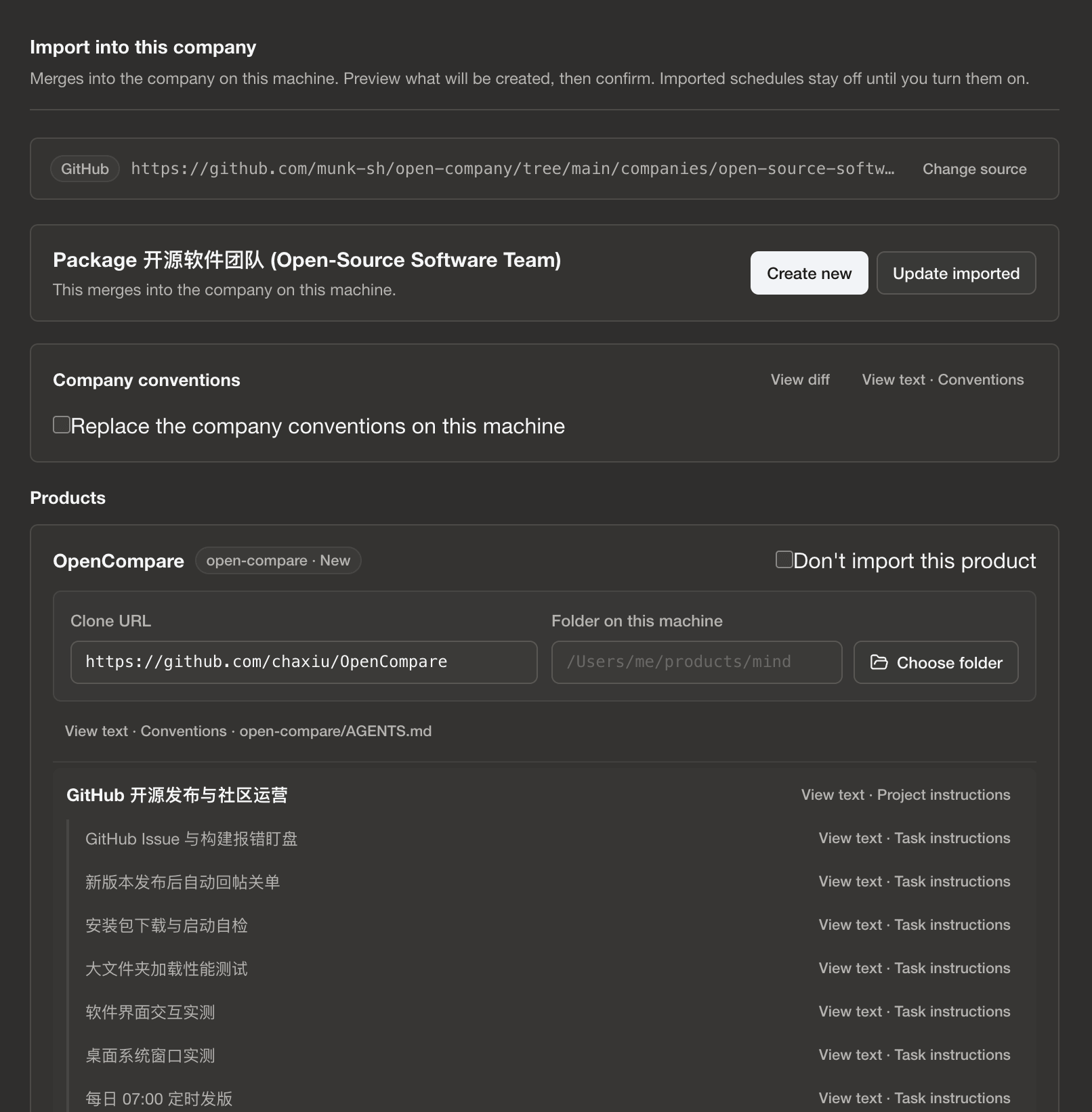
- Launch Import: Click Import into Munk AI on any template card at opencompany.run (which opens
munk://company/import?url=...), or click Import Company inside the desktop app and paste a repository URL or local folder path. - Preview Everything Before Writing: Before touching your disk, Munk AI shows a complete summary of the products, source repositories, tasks, and every
guards/*.mjsscript inside the package. - Check Environment Requirements (
requires): If a product lists required secret names (requires.secrets) or local platform logins (requires.logins), Munk AI highlights them clearly so you know what to prepare. - Schedules Start Off by Default: For safety, every task schedule is turned off after import. You can inspect the files, run a single shift manually, and enable schedules only when you are ready.
Exporting and Sharing Your Own Setup
Once you have tuned a set of agents, skills, and project shifts that work well together, you can export your setup as a clean open-company/v0 directory:
- Secrets & Logs Are Never Exported: Exporting packages only your team's practices (YAML, Markdown, Skills, and Guard scripts). Secret values, access tokens, machine-specific file paths, and run history are automatically excluded.
- Forkable with Zero Lock-In: Anyone who imports your package gets a working blueprint they can bind to their own repositories and models.